


Back to article
3330
Difficulty using the Speaker Link feature
If you cannot link speakers together to play in party or stereo mode, try the following:
Linking is a feature available with the following speakers:
- SoundLink Flex Portable Speaker (2nd Gen)
- SoundLink Max Portable Speaker
- SoundLink Micro Portable Speaker (2nd Gen)
- SoundLink Plus Portable Speaker
Make sure that both Bose apps compatible speakers are powered on and the speaker linking shortcut is enabled.
Bluetooth speakers that are compatible with the Bose app can only be connected together by enabling the 'Speaker Link' shortcut on both speakers. For more information, please refer to using the shortcut buttons and speaker link.
If using two of the same speakers, name them differently in the Bose app.
When connecting two same-model speakers, give them different names to help distinguish between the two. For more info, see Renaming a product.
Check for and install any available product updates.
Regardless of the issue you are experiencing with your product, try updating it. Visit btu.Bose.com and follow the instructions to ensure your product has the latest features and enhancements.
Try moving the speakers farther apart.
If you're experiencing audio delays when linking your speakers, adjusting the distance between them can help improve interference and synchronization. Keep them within Bluetooth range, which is about 33 feet (10 meters). However, this range can be reduced by walls, metal objects, doors, or other Bluetooth devices in the area.
Reset your product.
Much like rebooting a smartphone, your product might need to be reset on occasion to correct minor issues. For more info, see Resetting your product.
Restore the factory settings of your speaker.
If the speaker is powered on or becomes unresponsive, you can perform a Factory Reset.
Factory reset clears connected devices and language settings from the speaker and returns it to the original factory settings(including Equaliser and Custom Shortcut).
Factory reset clears connected devices and language settings from the speaker and returns it to the original factory settings(including Equaliser and Custom Shortcut).
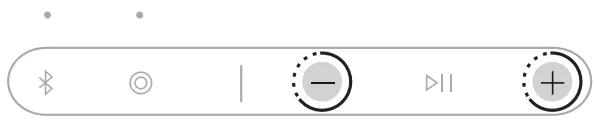
- Press and hold the Volume up button + and Volume down button - for 15 seconds until the Power light quickly blinks white for 3 seconds
The speaker powers off. - Press the Power button
.
The Power light glows according to the battery level. The Bluetooth light slowly blinks blue, and you hear “Ready to connect.”
Was this article helpful?
Thank you for your feedback!